Tips for Organizing a Productive Home Office Space
Creating a productive home office space is key to staying focused and efficient while working from home. Whether you have a dedicated room or just a small corner, organizing your workspace thoughtfully can make a big difference in your workday. Here are practical tips to help you set up and maintain a productive home office.
Assess Your Space and Needs
Before organizing, take a moment to evaluate the space you have and understand your work habits.
– Choose the Right Location: Ideally, pick a quiet area with minimal distractions and good natural light.
– Consider Your Work Style: Do you need a lot of desk space for papers or multiple monitors? Or do you mostly work on a laptop?
– Plan for Storage: Think about how much storage you need for office supplies, files, and books.
Knowing these factors upfront makes it easier to design a functional workspace.
Declutter and Simplify
A clutter-free workspace reduces stress and helps you maintain focus.
– Clear Your Desk: Keep only essential items on your desk. Store everything else in drawers or shelves.
– Regularly Purge: Go through your supplies and paperwork monthly to remove what you no longer need.
– Limit Personal Items: It’s nice to have a few personal touches, but avoid overcrowding your space.
Optimize Your Desk Setup
A comfortable and ergonomic setup helps prevent discomfort and boosts productivity.
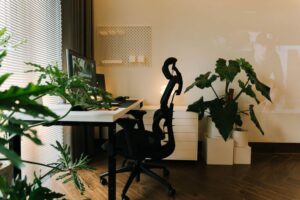
– Ergonomic Chair: Invest in a supportive chair that encourages good posture.
– Monitor Position: Place your monitor at eye level, about an arm’s length away.
– Keyboard and Mouse: Keep them within reach and at a height that keeps your wrists straight.
– Cable Management: Use clips or boxes to keep cords tidy and prevent tangled wires.
Use Smart Storage Solutions
Efficient storage keeps your supplies organized and easy to find.
– Desk Organizers: Use trays, pen cups, and small bins for frequently used items.
– Shelves: Wall-mounted shelves save floor space and provide easy access to books or decorative items.
– File Cabinets: Use labeled folders to keep paperwork sorted and accessible.
– Multi-Purpose Furniture: Consider desks with built-in drawers or shelves.
Create Zones for Different Tasks
Dividing your workspace into zones can streamline your workflow.
– Work Zone: Your primary desk area for computer work.
– Reference Zone: A place for books, notes, or materials you frequently consult.
– Storage Zone: Dedicated shelves or cabinets for supplies.
– Break Zone: If space allows, a small area for stretching or relaxing briefly.
Having clear zones helps keep your workspace organized and focused.
Lighting Matters
Good lighting reduces eye strain and enhances mood.
– Natural Light: Position your desk near a window if possible.
– Task Lighting: Use a desk lamp with adjustable brightness for focused tasks.
– Avoid Glare: Make sure screens aren’t reflecting direct sunlight.
Personalize Without Overdoing It
Adding personality to your space can make it more enjoyable and inviting.
– Plants: Small plants boost air quality and add warmth.
– Artwork or Photos: Choose a few inspiring images or photos.
– Colors: Use colors that motivate you, but keep them balanced to avoid distraction.
Establish Daily Habits
Organization is an ongoing process supported by good habits.
– Start and End Your Day with a Clean Desk: At the end of each day, spend a few minutes organizing your space for the next day.
– Use To-Do Lists or Planners: Keep your tasks visible to stay on track.
– Limit Distractions: Turn off unnecessary notifications and set specific times for email or social media.
Consider Technology Tools
Technology can help optimize your workspace and productivity.
– Cable Organizers: Help manage power cords and prevent tangles.
– Docking Stations: Simplify connections for laptops and peripherals.
– Noise-Canceling Headphones: Great for focus, especially in shared or noisy environments.
Keep Comfort in Mind
Comfort encourages longer, more effective work sessions.
– Temperature Control: Use fans or heaters if needed.
– Break Time: Schedule regular breaks to stretch and rest your eyes.
– Hydration and Snacks: Keep a water bottle and healthy snacks nearby.
—
Organizing your home office doesn’t require a complete makeover; small, thoughtful changes can vastly improve your space and productivity. Evaluate your needs, keep your environment tidy, and create a workspace that motivates and supports your work every day. With these tips, you’ll be on your way to a more efficient and enjoyable home office experience.